공지사항
[Important] Cyber Campus Login Restriction Criteria and Access Guide Following Security Enhancement
Hello,
This is the Center for Distance Education at Jeonju University.
To enhance Cyber Campus security, login access restrictions based on the number of failed login attempts have been implemented starting this semester.
If you are having difficulty logging in or your access has been restricted due to repeated failed login attempts, please refer to the information below.
1. Login Restrictions Due to Failed Login Attempts
- Cyber Campus login access will be restricted for the day if you fail to log in 5 times within 1 hour or 10 times within 1 day.
- If you are unable to log in or your login access has been restricted, please log in to inSTAR → click “Cyber Campus Homepage(사이버캠퍼스 홈페이지 바로가기)” at the bottom right.
- By accessing Cyber Campus through inSTAR, you can enter Cyber Campus without logging in again, and your accumulated failed login attempts will be reset.
- If no additional action is taken, the login restriction will be automatically lifted the following day.
- If you need the restriction to be lifted on the same day, please contact the Center for Distance Education (063-220-2402) or make an inquiry through the Office of International Affairs or your department assistant.
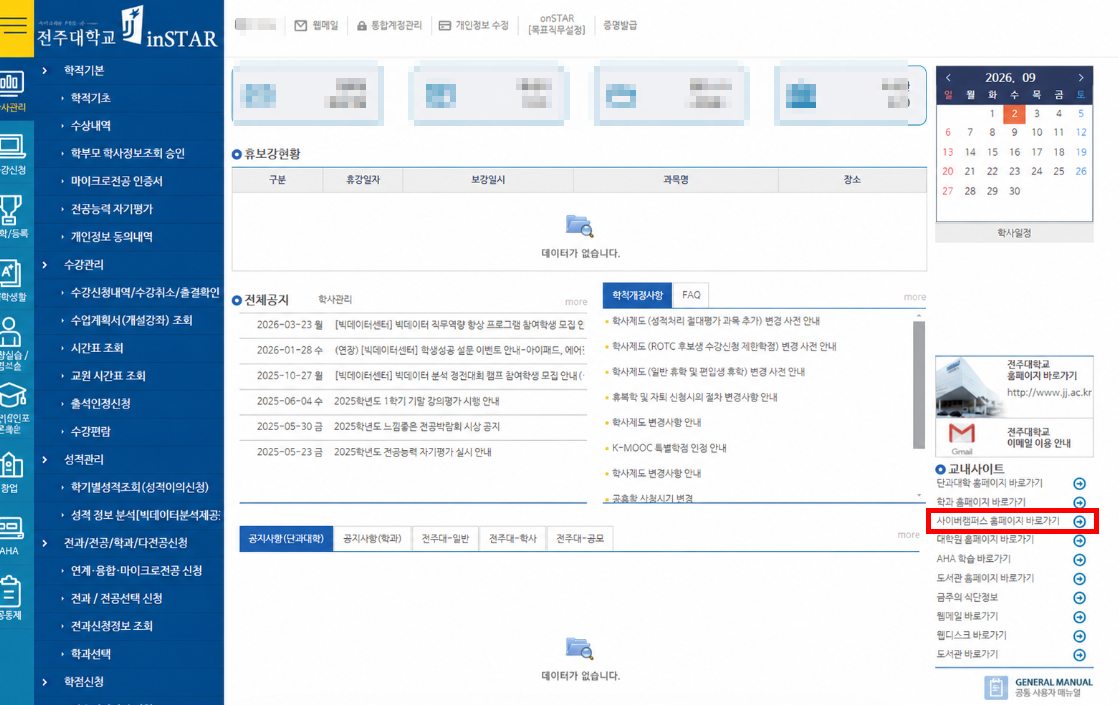
2. If You Are Unable to Log In
If you are unable to log in directly to Cyber Campus, please avoid repeated login attempts and use inSTAR to access Cyber Campus first.
inSTAR Login → Click “Cyber Campus Homepage(사이버캠퍼스 홈페이지 바로가기)” at the bottom right
Using this method will allow you to access Cyber Campus directly and reset your accumulated failed login attempts.